Role
UI UX Designer
Timeline
2019
Tools
SketchFigmaAdobe PhotoshopAdobe IllustratorInVision
Skills
Wireframing & PrototypingUser Journey MappingDesign System CreationUX Research
A tablet application giving professional soccer coaches real-time tactical analysis during live matches. Built for the Mexican Football Federation and presented to the FMF.
The Challenge
Create a mission-critical tool that enables professional soccer coaches to analyze statistics and videos in real-time during matches, providing actionable insights that could influence game outcomes through informed tactical decisions under extreme pressure.
The Outcome
Successfully developed and presented to the Mexican Football Federation, demonstrating the platform's potential to revolutionize sports analysis in Mexican soccer across Primera División, youth categories, and women's professional teams.

Challenge Understanding
When the CEO of Golstats introduced me to "Falcon," the goal was clear: give professional soccer coaches a tool to make tactical decisions during live matches, backed by real data. The name set the expectation: sharp, fast, precise.
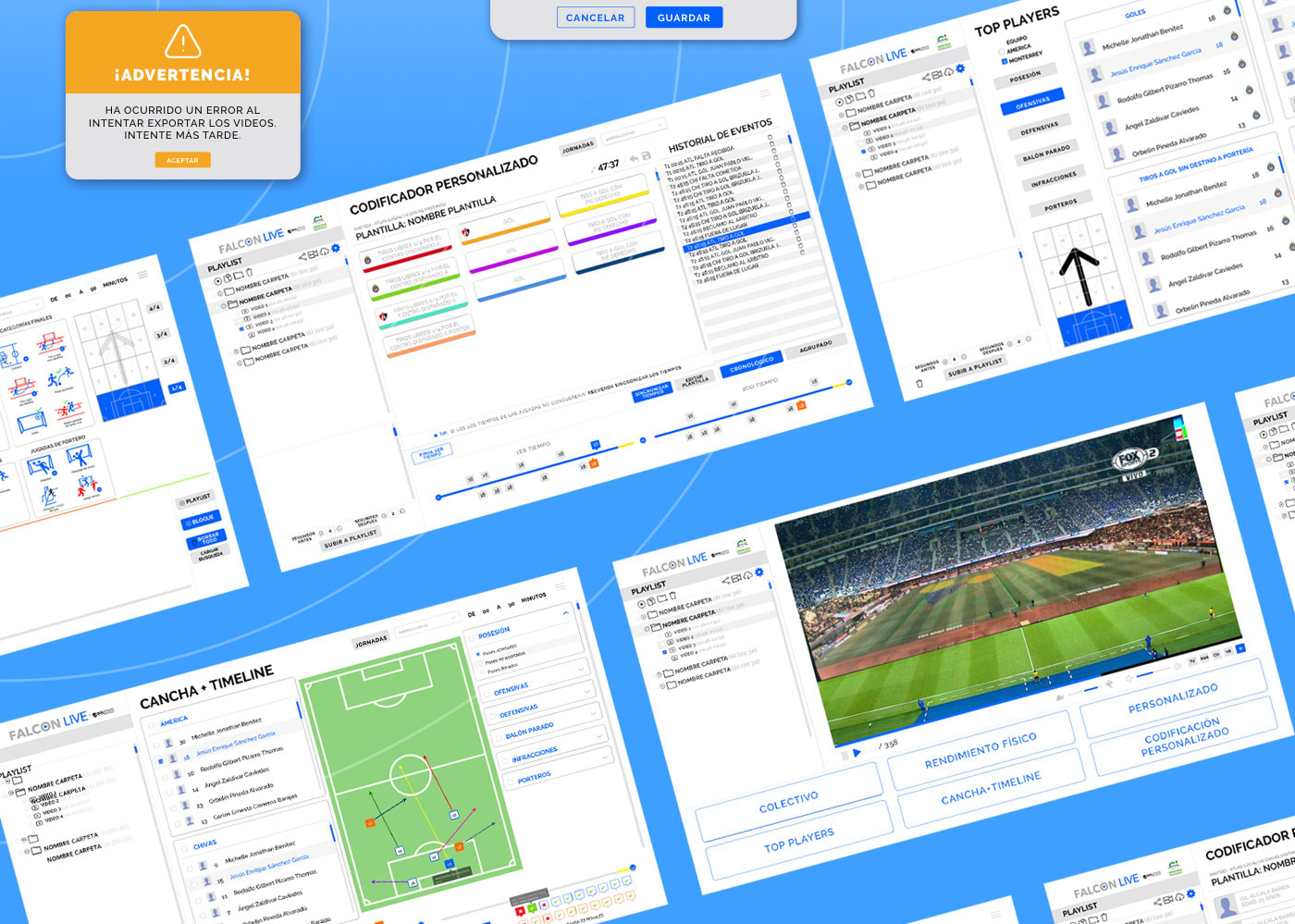
The platform ran on Windows touchscreen tablets, positioned on the bench during games. The Golstats team captured video and statistical data in real time, and coaches could query it mid-match. The central design challenge was the rule concatenation system: coaches could combine up to three conditions to find specific play patterns, for example "right-side attacks that ended in a pass, then a cross, then a corner kick." The interface had to make that kind of Boolean logic feel natural under pressure, while also preventing combinations that don't make sense in football's actual flow.
User research was conducted with the Product Owner and me, interviewing coaches and analysts from Primera División, Sub-23, Sub-20, and women's teams. Each audience had different analytical needs, but all shared the same constraint: no time to figure out an interface during a match.

Design Approach
Designing for a touchscreen tablet in a stadium environment shaped every decision. Elements had to be large enough to tap accurately under pressure, readable in bright sunlight, and operable with one hand. There was no room for dense UI: every screen had to communicate at a glance.
The rule concatenation system was the most complex piece. I designed the interaction so that valid next-rule options appeared based on what the coach had already selected, preventing impossible sequences automatically. Coaches could drill from a broad pattern to a very specific play in a few taps, then immediately see the matching video clips alongside the statistical data.
The video player was custom-designed for analysis, not playback. Controls were optimized for scrubbing, frame-stepping, and tagging moments during review. It had to integrate tightly with the stats layer so coaches could jump from a data point directly to the relevant footage.
For handoff, I worked with Sketch and later Zeplin to document components and specs for the Java development team (4 developers, backend and frontend). InVision was used for clickable prototypes during user testing sessions with real coaching staff.

Implementation & Integration
The team was: 4 Java developers (backend and frontend), 2 QA, 1 PM, 1 PO, and me as the sole designer. I handled all UX research, interaction design, and visual design, including icons and visual elements produced in Photoshop and Illustrator.
The video player integrated with the statistical data layer: a query result returned not just numbers and charts, but the exact video clips matching the tactical pattern. Coaches could validate the data by watching the plays directly.
The interface had separate layers for different roles: analysts needed the full rule engine and export capabilities, coaches needed a fast, focused view for in-match decisions, and administrative staff needed access management. All of them ran on the same Windows tablet application.
User testing happened in two phases: internal sessions with Golstats staff, then live sessions with actual coaching teams. The live testing was the most valuable: it revealed how the cognitive load of a real match environment differs from a lab setting.
Results & Learnings
Falcon was officially presented to the Mexican Football Federation, and I was part of that presentation. The platform demonstrated how real-time tactical analysis could work in practice at the highest level of Mexican football.
The app was built and deployed. There were permission-related constraints that affected broader rollout, but the design was implemented, the platform worked, and the FMF saw it in action.
The most complex design problem on this project wasn't the visual design. It was modeling the rule logic in a way that felt intuitive to coaches who don't think in Boolean terms. Getting that right required understanding football deeply enough to know which rule combinations are tactically meaningful and which are nonsense.
Working as the sole designer embedded in a technical team (PM, PO, 4 devs, 2 QA) over 9 months, I learned how to stay user-focused while navigating the constraints of a real-time data system. The live testing sessions with coaching staff were the most formative part of the process.
“Falcon represents the future of tactical analysis in Mexican football.”
Tags
#UX/UI#dashboard#analytics
Next Case Study